Throughout this course, we also want you to focus on your code quality in addition to the functionality of your code. For the complete list of code quality items we’ll look at throughout the quarter, please consult the code quality document. If we see code quality issues during code reviews, we will ask your group to resubmit the project with those issues fixed.
Collision Resolution
Last week, you implemented find_collision() to detect collisions between two convex polygons.
This week, you will implement collision resolution, which changes the velocities of the bodies based on the physics of the collision.
Here are your tasks for this week:
- Rewrite the destructive collision function and handler
- Update
compare_collision()to return the direction along which the bodies are colliding - Implement the physics collision handler
Finding the collision axis
When two bodies collide in 3D space, there is a contact plane tangent to both bodies at the point of collision. The collision creates a “normal force” perpendicular to the contact plane. In 2D space, there is an analogous contact line tangent to the bodies. Just as in 3D physics, the applied force is perpendicular to the contact line. We refer to the unit vector perpendicular to the contact line as the “collision axis.” (There are actually two perpendicular directions; we will choose the one that points from the first body towards the second.) In the example below, the black line is the contact line and the red vector is the collision axis (from the green body towards the blue body).
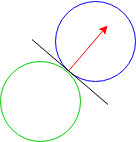
When bodies are polygons rather than continuous shapes, there is no longer a tangent line, but we can approximate a collision axis.
Since you implemented the Separating Axis method last week, the collision axis is simply the axis onto which the shapes’ projections have the least overlap.
Copying files Over
First, copy over the following library files from last week’s project:
body.cvector.cscene.c
You may/may not also have to copy code from last week’s forces.c and forces.h if
your teammates added helper functions/structs.
You will have to copy other files over as well, but they will be specified for you in the guide.
Collisions
We have added new collision functions for you in forces.h and forces.c. Like forces,
collisions are “registered” in the scene using the create_x() x_collision_handler() pattern.
Take a look at them for more detail, and take note of the following things:
collision_aux_t
We’ve added a new collision_aux_t struct in forces.c that the new collision functions reference. Note that
its structure is similar to that of body_aux_t with the exception of three additional fields:
-
handler: this is a collision handler that will run if a collision occurs between two bodies. Its type,collision_handler_t, has been defined for you inforces.h. -
aux: thisvoid *field is for any extra information that thecollision_aux_twill need access to. It’s a little bit meta and might be hard to wrap your head around at first, but this field will be especially helpeful when we need to reference variables like our state or scene. It can also be passed in as anaux_tto carry information about the force constant that certain collisions will use.
Take a look at collision_aux_free and note how aux is owned and freed by the collision_aux_t. Like before,
you can pass in NULL as the freer if the aux shouldn’t be freed.
Given this information, your next task is to rewrite
create_destructive_collision after implementing destructive_collision.
Note that with the new abstraction that we’ve made for creating collisions, these two functions should be very short.
Task 0.
Implement create_destructive_collision after implementing destructive_collision.
Collision Axis
First, take a look at collision.h. Since we care about the separating axis now, find_collision now
returns a collision_info_t struct that contains whether or not the bodies collided in addition to the axis.
We’ve already rewritten find_collision to use the new return type of compare_collision. Take a look at it
to see how compare_collision is supposed to interact with it.
Notice the double “overlap” variables. These variables represent the minimum overlap calculated by
the two collision functions. We’ll pass in their addresses to compare_collision so that the function
can update their values every time a new minimum overlap is found. If a collision has occurred, we’ll
compare the minimum overlap from both calls and return the separating axis that corresponds to the
smaller of the two.
Next, copy and paste your implementation of get_max_min_projections and compare_collision from last week into collision.c, taking
care not to overwrite the collision_info_t return type. Here are the changes that you will have to make:
- keep track of the collision axis that corresponds to the minimum overlap
- instead of returning
false, you’ll have to return acollision_info_twith that information.axiswon’t have to be set to anything meaningful since we can assume that it won’t be accessed if a collision hasn’t occurred. - calculate the overlap that occurs between the two projections. If the overlap is less than what
min_overlappoints to, update it along with the collision axis. - If every projection overlaps, return the collision axis along with
collisionset totrue.
Task 1.
Copy and paste your implementation of get_max_min_projections into collision.c and implement compare_collision in collision.c.
Computing the impulse
This week, we’re also adding elastic collisions to our physics engine (specifically, in forces.c).
You may remember from Ph 1a that when bodies collide, momentum is conserved.
However, kinetic energy is only conserved when the bodies collide elastically (like billiard balls).
You will implement collisions with variable amounts of elasticity, controlled by a parameter double elasticity.
If elasticity is 1, the collision is elastic.
If elasticity is 0, the collision is completely inelastic; if the bodies are moving along a line, they stick together when they collide.
Values of elasticity between 0 and 1 correspond to partially elastic collisions.
If elasticity is greater than 1, the collision is “super-elastic”: kinetic energy increases in the collision.
There is a simple formula for the impulse due to a collision with a certain elasticity, so we will apply impulses instead of forces to resolve the collision. The formula can be found on Wikipedia, but here’s an explanation:
Given that
- ma is the mass of the first body
- mb is the mass of the second body
- ua is the component of first body’s velocity along the collision axis (which points from the first body towards the second). Note that the component of a vector along a unit vector is just the dot product of the two vectors.
- ub is the component of the second body’s velocity along the collision axis (which points from the first body towards the second)
-
CR is the coefficient of restitution, i.e.
elasticity
The impulse applied to each body is parallel to the collision axis. The parallel component of the impulse applied to the first body is:

To conserve momentum, an equal and opposite impulse is applied to the second body. We have added this force_creator for you in forces.c.
Notes
Because bodies with mass INFINITY are not affected by forces or impulses, it is natural to use them as “walls” in a collision.
For example, you could have implemented the bounce demo in project01 by making the star collide elastically with an infinite-mass wall on each side of the scene.
This requires a minor change to the formula for computing the impulse: if one of the masses is INFINITY, the reduced mass (m_a * m_b / (m_a + m_b)) in the formula becomes the mass of the other body.
If two bodies collide in a tick and an impulse is applied to resolve the collision, they may still be colliding in the next tick.
In this case, a second impulse should not be applied to the bodies in the next tick.
A collision between two bodies will only be resolved if they were not colliding in the previous tick.
The logic for this has been implemented for you already in collision_force_creator.
Copy and paste sdl_wrapper.c, sdl_wrapper.h, and asset_cache.c from last week to this week’s project.
Task 2.
Implement physics_collision_handler in forces.c.
Take a look create_physics_collision to see how it will be used.
When you are done, run make test to see if your collision implementation works.
Note that make test only works before the game student finishes their section due to some import conflicts. To run make test
after the game student finishes their section, you should comment out any references to asset.h in body.c. Don’t forget to
comment it back in after you’re done testing!
Next, run the ref demo using make NO_ASAN=true pegs and make sure that it works as expected and look like the below. We have only provided the ref demo for NO_ASAN=true because ASAN causes it to be extremely laggy.
Once all your group members have finished, work with them to complete the extension (more information in the main project page).