Code Correctness
Throughout this course, we also want you to focus on your code quality in addition to the functionality of your code. For the complete list of code quality items we’ll look at throughout the quarter, please consult the code quality document. If we see code quality issues during code reviews, we will ask your group to resubmit the project with those issues fixed.
Implementing the engine is a prerequisite for implementing the game!
If you haven’t already, please do the Setup for the course!
Goals and Deliverables
This week, you will render an image onto your screen!
Ticks and the Main Run Loop
We’re going to be working through a lot of graphics-related code in this class, so it’s important to understand the basic concepts behind drawing graphical content to the screen.
When we talk about graphics in the context of writing software, we are dealing with computing the contents of individual frames in real-time, clearing the canvas of the previous frame, and drawing the new computed frame, all at regular intervals. If you want your graphics to look realistic, you need to have a reasonable measurement of the time between frames, since our goal is to generate a graphical representation that is independent of the speed at which frames are processed by the computer. This is why low frame rates in graphics-intensive games result in a scene that is choppy – each frame encompasses a large amount of real-world time, causing objects to move large distances in each frame. The most basic implementation of a graphical application, then, looks as follows:
while app_is_running:
    dt = time_since_last_frame()
    object_pos = compute_new_positions(object_pos, dt)

    clear_screen()
    draw_frame_offscreen()
    display_frame()
We’ve provided a few helper functions to help facilitate writing these functions. You can see how they interface with the lower-level SDL2 library in sdl_wrapper.c.
Files of Importance
It will be extremely helpful to look through the actual files mentioned in this guide while reading it. You’ll have to look through these files eventually so it helps to gain context on them now!
The above basic loop is implemented in emscripten.c, which relies on a number of functions you will write in your demos - namely, emscripten_init, emscripten_main, and emscripten_free. emscripten.c serves as the basic functionality of all our demos - you do not need to modify this file. Notably, because image.c implements the main while loop described above, your image.c file should not have a main loop.
The header file for the functions you write in your demo is state.h, which tells emscripten.c that these three functions are properly defined elsewhere. You do not need to write a state.c file - you should write the three functions in the header in your image.c demo as mentioned above. Notably, state.h also includes an opaque type definition for a “state”. This is a struct that you will define in each of your demos (here, in image.c). This state struct is how you will pass information between your three functions - anything you initialize in emscripten_init that you need in your emscripten_main loop should be put in this state accordingly and returned. You are responsible for defining the state’s parameters, malloc’ing it in emscripten_init and freeing it in emscripten_free.
Using the basic breakdown of the files above, and the documentation in sdl_wrapper.h and state.h, you should be able to get a good idea of how to implement a graphical application in C, using our wrapper library.
For a reference of a working demo that uses this overarching structure, please consult https://gitlab.caltech.edu/cs18-26sp/emscripten-demo.
Although it does not use the same abstractions, the circle.c demo works with emscripten.c and state.h in the same way you will.
The game loop might seem a bit abstract this week since you are just rendering a static image. However, it will be clearer to see in the pacman demo (which one of your teammates is implementing).
Images
Helpful Tip for Debugging: Run your game in Chrome! Other browsers may have issues with emscripten, and you can also debug and see what you print in Chrome by right-clicking and clicking “Inspect” and “Console”.
The sdl_wrapper files contain functions that help us with rendering images. Take a look at sdl_wrapper.h
for documentation on what the functions do. Your job will be to implement the functions themselves
in sdl_wrapper.c. We’ll briefly go over what they do.
sdl_get_image_texture
This function initializes and returns a pointer to an SDL_Texture
object that represents an image. It creates the texture with the help of IMG_LoadTexture, which takes in the filepath to the image and an SDL_Renderer *.
Note that we’ll have to pass renderer to IMG_LoadTexture, which is the same SDL_Renderer * that is being used
in our other sdl_wrapper functions like sdl_init, sdl_draw_body, etc. This
was done intentionally and is an example of encapsulation: by defining all sdl-related helper functions
in sdl_wrapper, we abstract away details of image rendering so that
the user of the function only needs to worry about parameters like the correct filepath.
For the current project and all future projects, make sure that all your assets (images, text, sound files, etc.) are stored in and referenced from ONLY the assets folder. Not only is this for stylistic purposes, but your files won’t be compiled if they aren’t in the right folder.
sdl_get_rect
This function initializes and returns a pointer to an SDL_Rect object.
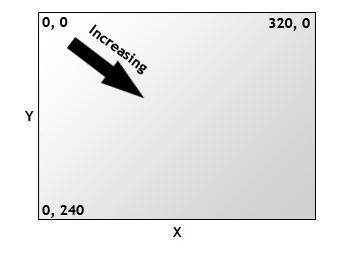
An SDL_Rect is an abstraction for a rectangle in the SDL library that has a
location (x,y) and dimensions (w,h). Notice that in SDL, the origin (0,0) is
at the upper left of the window, and the y coordinates increase from top to bottom, not bottom to top:
sdl_render_image
This is the function that actually renders the image. SDL_RenderCopy will be helpful here.
It takes in a SDL_Renderer * (notice a pattern?), SDL_Texture *, and two SDL_Rect *’s. The
first SDL_Rect * represents the area of the texture to render, and the second
SDL_Rect * represents the target area to render to. Both arguments can be
set to NULL to represent the entire texture and rendering target, respectively.
image.c
Task 0.
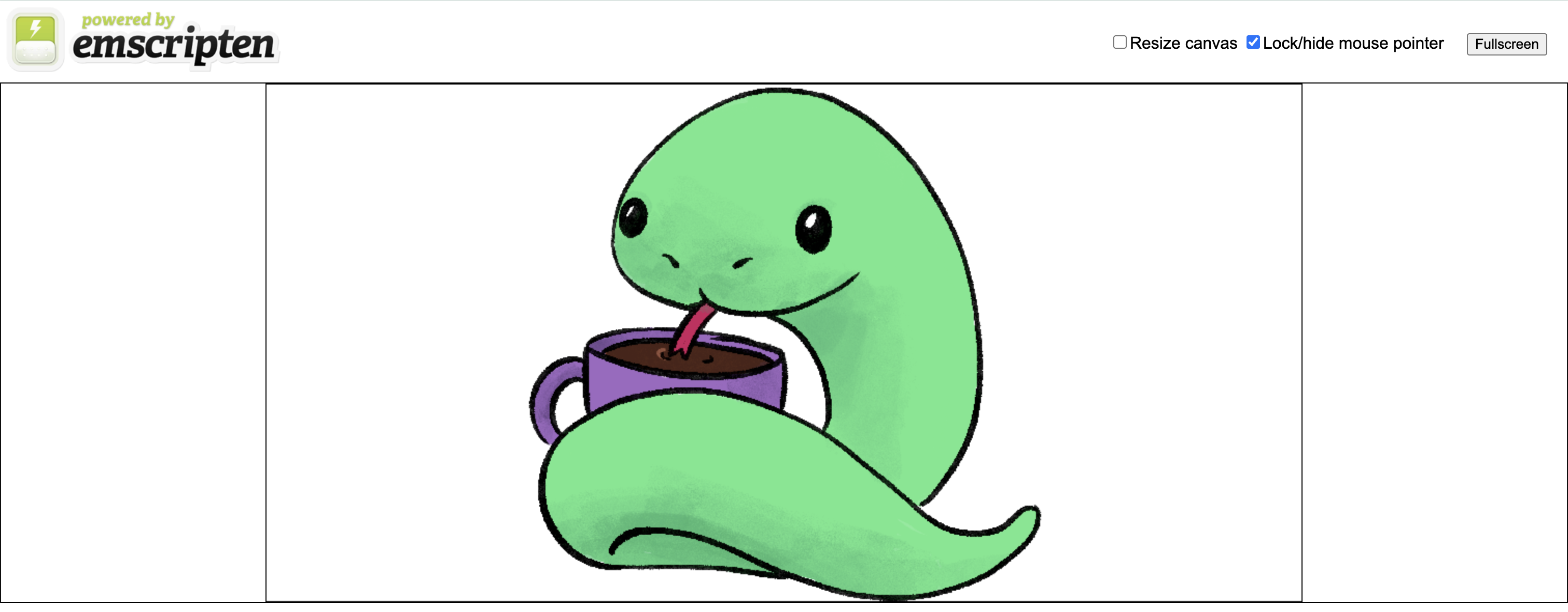
Your first task is to complete the functions in sdl_wrapper.c and write code in image.c so that when you compile it,
the image in assets/cs1_logo.png will appear on the screen like the following:
In the image.c file, we’ve given you some constants that should be helpful when writing your code.
Here are some other helpful reminders:
We want to load the SDL_Texture for our image only once. A common mistake
when rendering images in C is loading a texture for the same image repeatedly in
the game loop, unnecessarily allocating memory every time it runs.
While not noticeable at this stage, once you start adding more images to your game, this may cause it to run much slower.
In the worst case, this may lead to memory leaks!
Speaking of memory leaks, it’s important that any SDL objects that we initialize
are disposed of properly in emscripten_free. Similarly to how structs that we define
can have their own free functions (like list_free or body_free), SDL objects
can also have their own free functions. In the case of SDL_Rect, we just malloc’ed
it normally, so free works fine. However, we create a SDL_Texture using IMG_LoadTexture,
which means that using free isn’t enough. The documentation should
tell you which function to use to dispose of SDL_Texture objects properly.
If you are having trouble rendering images, SDL_GetError() may come in handy when debugging your code.
For some help of how the functions work with each other, take a look at some resources our website!
Running and Testing your Code: make and the Makefile
All the projects in our class will have the following directory structure:
- include: header files go here
-
library: source files for your libraries (e.g.,
list,body, etc.) - demo: source files for the demos go here
- game: source files for the game go here
- tests: test source files go here
- out: built object files will be generated here
- ref: reference object files for the demo and game are provided here
- bin: built binaries will be generated here
We have provided you with a Makefile which is set up to build the project. It allows you to run the following commands:
-
make demo: compile the demo and runs the web server -
make game: compile the game and runs the web server -
make test: compile all libraries and tests and run all the tests -
make NO_ASAN=true democompiles the demo without asan - this is recommended if the demo lags. -
make server: Run the web server with the current binaries -
make clean: remove all generated binaries
This year, we will be testing demos and games via a web interface hosted on labradoodle, using a library called emscripten.
Every student has been assigned a port, which you can see after running make game or make server, or by running cs3-port in a shell on labradoodle.
To run your game, you should run make game or make server and then navigate to the link printed to the shell (the last line before “Serving HTTP on …”) and click the compiled demo .game.html file. If you see an error that says Address already in use, please run cs3-kill-web in the terminal and rerun make game. If you’ve made changes to your code but make game generates the link instantly, you might have to run make clean before make game again to recompile the game.
One additional part of testing any game/demo code will be ensuring that there are no memory leaks. For the
physics engine, we can run the leak sanitizier after the test finishes, but for demos/games, there is no obvious “end of execution” unless the player loses/wins, which isn’t always defined. Thus, we’ve set up the “esc” key
on the keyboard to run emscripten_free and kill the demo/game when pressed. Once you press “esc,” you should
be able to see any memory leaks if you Inspect Element and go to “Console.” If you see any memory leaks,
make sure to fix them!
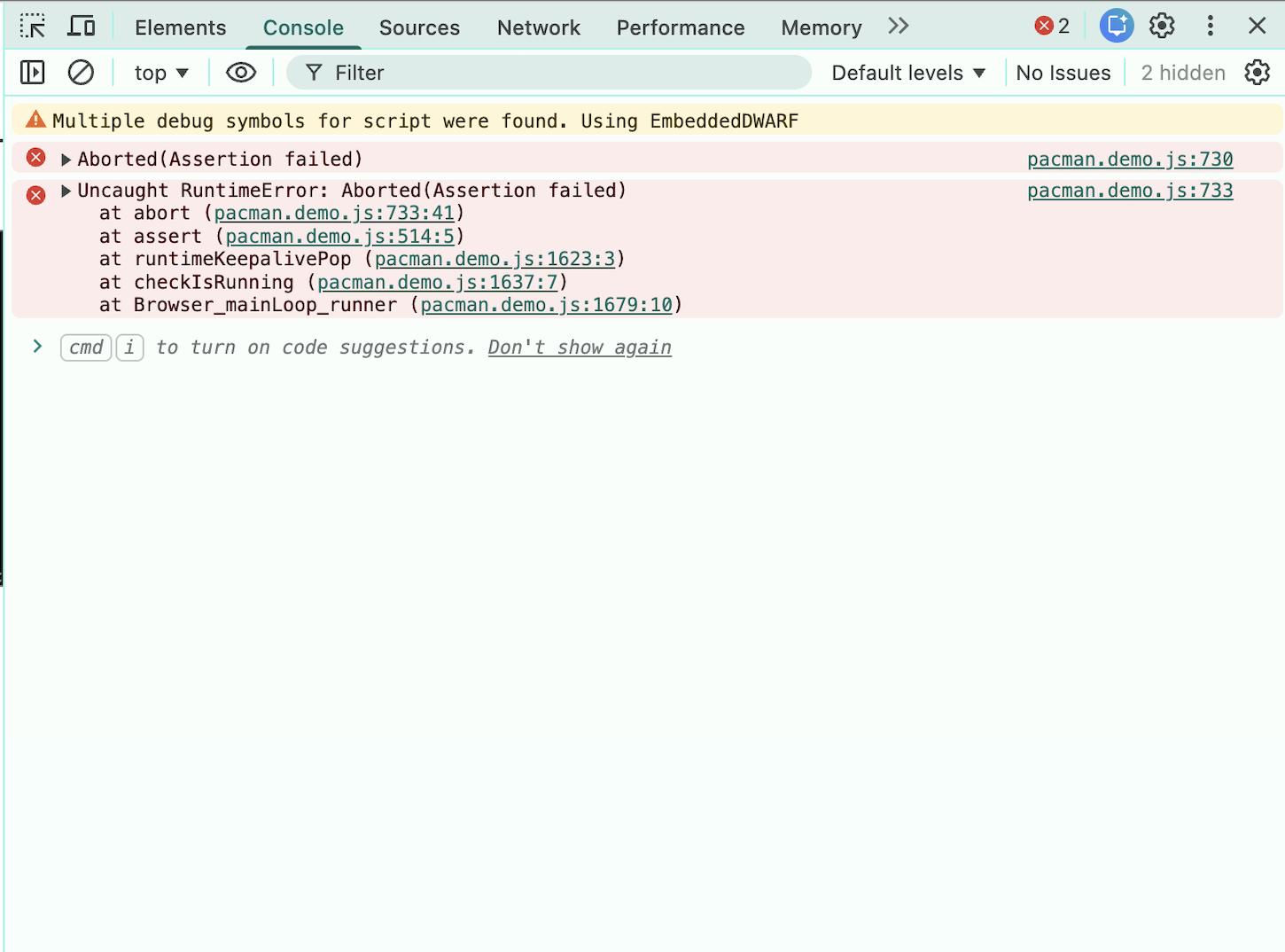
If there are no memory leaks, the console should look like this (you can ignore the RuntimeError which will always get thrown when we kill the demo):
If there are memory leaks, the console should report the lines that are causing them like this (the relevant lines are boxed in blue):
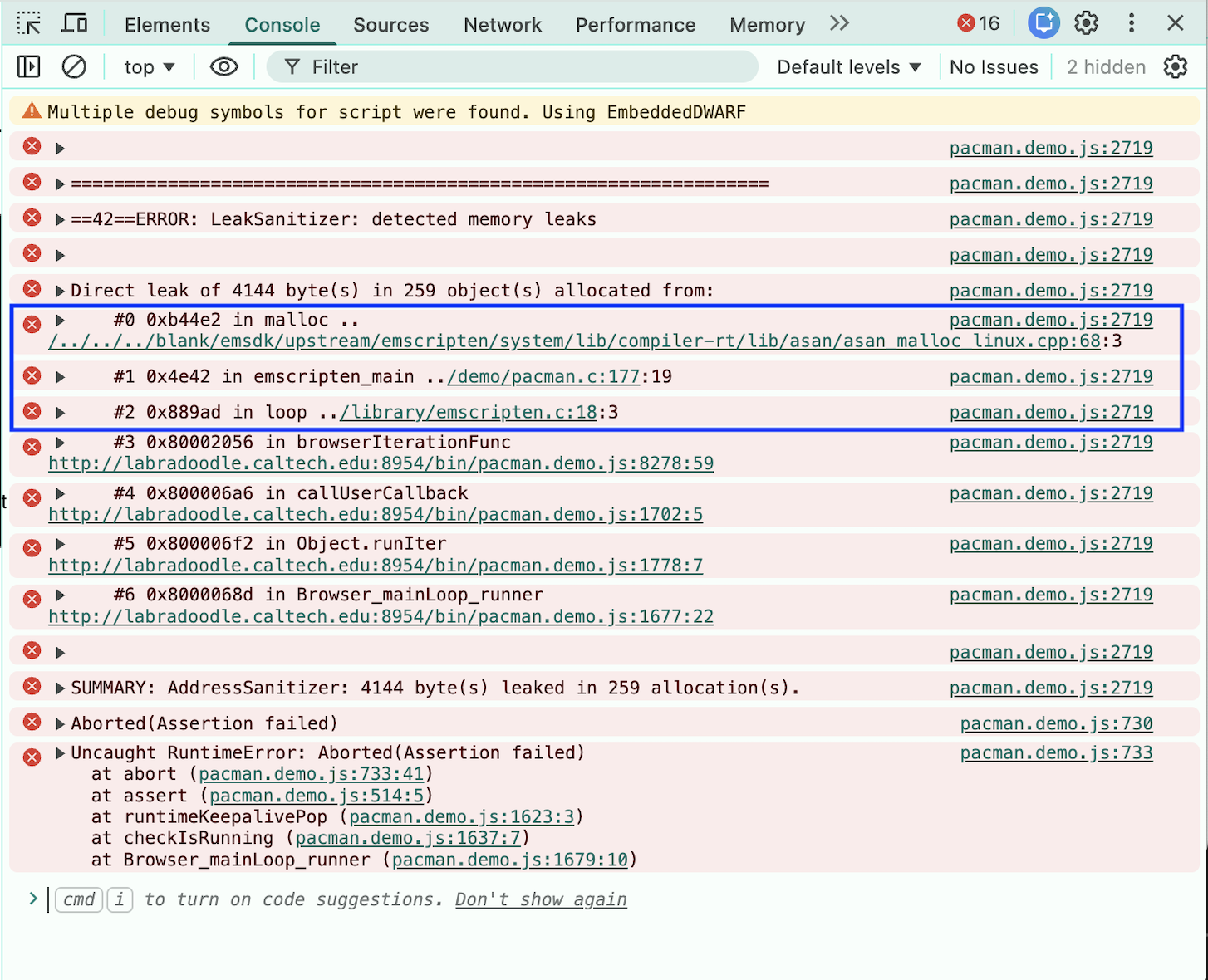
In this example, the memory leak was caused by our malloc call on line 177 of pacman.c.
Note that there is nothing special about the “esc” key in this case; we’ve just chosen to bind it to emscripten_free. Once you start working on your final game, feel free to change this keybinding, but
please don’t do so until we are done with all the projects this term.
We will take off points if your code has memory leaks, so be sure to check for them before you submit your code!
Feel free to play around with different images! As long as you meet the above guidelines, you are free to use different assets.
Once you are done, push your code to GitLab.
Once all your group members have finished, work with them to complete the extension (more information in the main project page).